
Accounts payable (AP) processing is the controlled workflow for receiving supplier invoices, verifying what is owed, obtaining approval, paying suppliers, recording the transaction, and reconciling the result. It connects an invoice to the purchase, authorized decision, payment evidence, and accounting record.
A reliable AP process helps prevent duplicate or unauthorized payments, protects cash forecasting, gives suppliers clearer answers, and leaves a defensible audit trail. This guide covers the end-to-end accounts payable process flow, operational bottlenecks and KPIs, and a practical approach to AP automation. To win budget for it, see how to build the AP automation business case in hard numbers.
Quick answer: What is the accounts payable process?
The accounts payable process begins when an invoice is received and ends when the liability, payment, and bank activity are correctly recorded and supported by evidence. The normal sequence is:
- Capture the invoice through an approved channel.
- Validate supplier, invoice, tax, and duplicate information.
- Match it to a purchase order (PO) and receipt when relevant.
- Code the expense, tax, entity, and other accounting dimensions.
- Route it to the right approver or exception owner.
- Schedule and execute payment under controlled release rules.
- Send remittance and post the accounting entries.
- Reconcile AP, payment-provider or bank activity, and the general ledger.
For every invoice, finance should be able to show where it came from, what it relates to, who approved it, how it was paid, and how it was recorded.
Accounts payable process flow
The core flow is consistent across most organizations, even though ownership and systems differ.
| Stage | Core action | Key control or output |
|---|---|---|
| Invoice intake | Receive and classify invoice files or structured data | Original document, source, receipt timestamp |
| Validation | Check mandatory fields, supplier status, totals, tax, and duplicates | Clear pass/fail result and exception reason |
| Matching and coding | Compare with PO/receipt where applicable; assign accounting data | Match evidence and coded distribution |
| Approval | Obtain budget and policy approval; resolve exceptions | Attributable decision, timestamp, comments |
| Payment | Select eligible invoices, release funds, and track execution | Payment reference and status |
| Close | Send remittance, post, reconcile, and retain records | Reconciled entries and audit package |
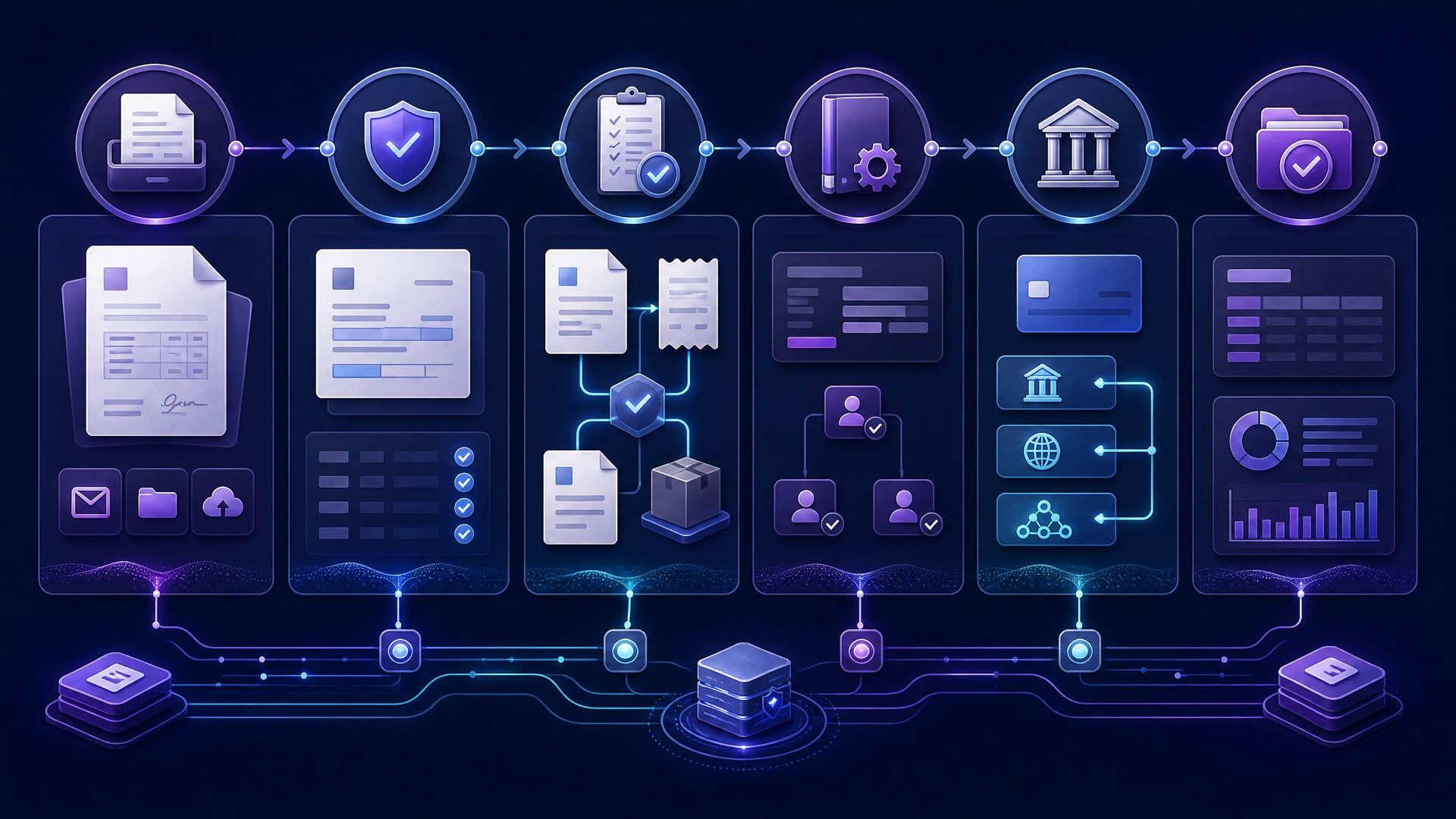
The end-to-end AP invoice process
1. Capture invoices through a controlled intake channel
Invoices arrive as PDFs by email, through supplier portals, electronic data interchange (EDI), or occasionally on paper. In a growing number of markets they must also satisfy e-invoicing mandates before payment clears. Direct each channel into a managed intake queue rather than leaving invoices in individual inboxes, chat threads, or shared drives with no accountable owner.
At receipt, retain the original document and record the supplier, invoice number, entity, currency, and receipt timestamp. An invoice addressed to the wrong company or missing documentation should enter a correction path before payment.
2. Validate invoice data and screen for duplicates
Validation confirms that the document is usable and the payee is legitimate. Common checks include whether the supplier is active, the invoice number and amount are complete, currency and tax values are plausible, payment terms are applied consistently, and the invoice does not duplicate a record already in AP.
Duplicate screening should use more than a single exact field. A supplier invoice number, amount, date range, PO reference, and document fingerprint can together identify near-duplicates that manual reviewers may miss. When a check fails, assign a specific reason such as “possible duplicate invoice” or “supplier not enabled for this entity”; a generic review status creates an unmanageable queue.
Bank-detail amendments are a distinct, high-risk supplier-master-data event. They need independent verification and should not be handled as a routine invoice exception. See the vendor bank account change controls guide for that focused control design.
3. Match the invoice to the underlying commitment
Matching tests whether the invoice reflects an authorized purchase and, where required, what the organization received.
- A two-way match compares invoice price and quantity with the PO.
- A three-way match also compares the invoice with a goods receipt or service confirmation.
- A non-PO invoice follows a documented alternative: confirm the business purpose, supplier, coding, and authorized approver before it can proceed.
Tolerance rules should be deliberate and limited. Small, approved price or quantity differences may pass automatically; material variances should pause the invoice and identify the resolver—usually a buyer, requester, receiver, or supplier. A high volume of matching failures is usually an upstream purchasing or receiving problem, not an AP productivity problem.
4. Code the invoice accurately
Coding translates an invoice into the accounting data needed for reporting and close. It can include the general-ledger account, cost center, department, project, legal entity, location, tax treatment, and intercompany or accrual designation.
Recurring suppliers may have reliable coding patterns, but automation should only suggest codes from controlled history and current master data. New suppliers, capital expenditure, prepaid expenses, cross-entity charges, and unusual spend deserve a policy-driven review.
5. Route approvals and resolve exceptions
Approval should reflect the spend’s substance, not simply who happened to receive the invoice. A useful approval matrix considers entity, amount, cost center, category, project, whether a PO match passed, and the type of exception. The approver needs the invoice, match result, coding, and relevant comments.
Maintain separation of duties where practical. The person requesting a purchase should not be the only person able to approve the invoice and release payment. Preserve approval decisions, timestamps, delegation, and override comments with the invoice record. For approval-matrix design and escalations, see the B2B payment approval workflow guide; payment authorization itself remains a separate control from invoice approval.
6. Schedule and execute payment
Approved invoices enter a payment proposal or queue. Payment dates should account for contractual due dates, early-payment discounts, cash forecasts, bank cutoffs, weekends, currency availability, and approved payment methods. Paying solely because an item is visible in a batch can waste cash; delaying a valid obligation without a reason can damage supplier relationships and forfeit discounts. Because timing moves cash in both directions, it is a working-capital decision as much as an AP control — the wider trade-offs are mapped in our guide to working capital optimization in B2B payment strategy.
Before payment release, confirm that the batch contains approved, unpaid invoices and that totals agree with source records. Apply the organization’s treasury and payment-release controls, including a second review where required. Track statuses precisely: approved, scheduled, submitted, accepted, settled, returned, and rejected are not interchangeable. In particular, submission is not proof that the supplier has received funds.
7. Communicate remittance, post, and reconcile
After execution, store the bank or provider reference, execution time, payment amount, currency, and outcome. Send remittance advice that tells the supplier which invoices, credits, or deductions the payment covers. Clear remittance reduces supplier payment inquiries and speeds cash application.
The accounting close then links the invoice liability, expense or inventory distribution, tax, settlement, bank fees, and foreign-exchange differences to the AP subledger and general ledger. Reconciliation compares AP records against payment and bank activity, investigating returned payments, partial settlements, timing differences, unmatched fees, and duplicate references. Retain the original invoice alongside material edits, match results, approvals, payment evidence, journal entries, and reconciliation outcome.
Where AP processing differs from adjacent finance workflows
AP processing touches several related functions, but it should not be confused with them:
- ERP integration is the technical and operational exchange of records between AP, accounting, procurement, and payment systems. It enables AP processing but does not define the business controls. For broader mappings, retries, and data ownership, use the ERP and accounting integration guide.
- Payment approval is the authorization to release a payment, often involving treasury or a bank workflow. AP invoice approval establishes that an obligation is valid; it does not eliminate payment-release controls.
- Reconciliation is the closing control that compares subledger, payment, bank, and general-ledger records. It is the final AP stage, not a substitute for capture, matching, or approval.
- Vendor bank-change management governs changes to supplier payment instructions. Because it is fraud-sensitive master-data maintenance, it needs verification independent of the invoice path.
- Accounts receivable (AR) is the mirror-image workflow — issuing invoices and collecting cash from customers. Faster inbound collections shorten the funding gap that strains the payables cycle; see the accounts receivable automation guide.
Keeping these boundaries explicit prevents a common failure: assuming a system connection or approval screen has solved the entire payables control environment.
For the cash-cost side of paying suppliers, see the international supplier payment cost calculator.
What accounts payable process transformation changes
AP process transformation is not just buying software. It is a deliberate redesign of how invoices move from receipt to payment: who owns each step, what evidence is required, where exceptions go, and how performance is measured. Organizations usually transform AP for four reasons: rising invoice volume across more entities and currencies, audit and fraud exposure from manual controls, weak cash and accrual visibility, and supplier pressure for faster, more predictable payment.
Most programs move through four stages:
- Standardize — one invoice intake channel, one chart-of-accounts mapping, one approval matrix.
- Centralize — consolidate processing so volume is handled consistently across entities.
- Automate — apply capture (OCR/ICR), duplicate detection, PO matching, workflow, and payment execution.
- Optimize — use cycle-time, exception, and cost-per-invoice data to remove what is left.
The transformation only works when the target operating model is defined before software is chosen. Replicating a broken manual process inside a new tool simply makes the disorder faster.
AP invoice processing: from invoice to approved payment
Invoice processing is the engine inside accounts payable. Whether an invoice arrives as a PDF, an e-invoice, or a supplier-portal submission, a controlled process answers the same questions: Is it real and addressed to us? Does it match what we ordered and received? Is the coding correct? Who is accountable for approving it? When and how will it be paid?
Automation helps most in the high-volume, low-judgment steps — data capture, duplicate checks, PO and receipt matching, tax-code suggestion, and status routing. Human review stays on real exceptions: price or quantity variances, missing receipts, new suppliers, or changes to bank details. The target is straight-through processing for clean invoices and a fast, documented path for the rest.
Common bottlenecks and useful KPIs
Most AP delays are predictable. Diagnose them by queue and reason rather than treating all slow invoices alike.
| Signal | Likely cause | First response |
|---|---|---|
| Invoices age before entry | Decentralized intake or unclear queue ownership | Create a shared channel, receipt timestamp, and escalation target |
| Match exceptions are frequent | Weak PO data, receiving discipline, or tolerances | Segment by supplier, buyer, and reason; repair the upstream source |
| Approvals stall | Incorrect routing, unavailable approvers, unclear authority | Add delegated approvers, reminders, and aging escalation |
| Supplier payment queries recur | Inconsistent execution status or remittance | Send payment references and make status visible to AP |
| Month-end has unmatched items | Settlement events and accounting postings are disconnected | Reconcile with stable references and assign an exception owner |
Track a concise scorecard with stable definitions:
- Invoice cycle time: receipt to approval, posting, or payment—state which endpoint is used.
- First-pass match rate: invoices that match without an exception.
- Exception rate and aging: manual resolutions required, broken down by reason and time open.
- Touchless processing rate: invoices completed without manual intervention, with a documented scope.
- On-time payment rate: approved invoices paid by their contractual due date.
- Cost per invoice: allocated AP operating cost divided by invoice volume.
- Approval aging: time waiting for a decision, separate from time AP spends processing.
- Reconciliation backlog: unmatched payment or bank items at a defined cutoff.
Do not optimize one KPI in isolation. A higher touchless rate is not an improvement if it comes from overly broad tolerances or weak duplicate controls.
Selecting AP automation and implementing it safely
Start with process discipline, then automate the normal path. Map every invoice source, handoff, system, exception, and manual re-keying step. Standardize the meanings of received, approved, paid, and posted; clean supplier, terms, approver, and chart-of-accounts data; and define an owner and service-level target for each common exception.
The best AP automation supports straight-through processing for low-risk, well-matched invoices while preserving human review for exceptions and sensitive actions. Evaluate whether a platform can provide:
- capture from the channels your suppliers actually use, with extraction confidence checks;
- duplicate detection, supplier and tax validation, and controlled coding suggestions;
- two-way, three-way, and non-PO workflows with configurable tolerances;
- approval routing by entity, amount, category, project, and exception type, plus auditable delegation;
- payment proposals that exclude unapproved, duplicate, already-paid, or changed records;
- status events for settlement, returns, and rejections, plus remittance generation;
- posting and reconciliation through stable identifiers, error logs, retries, and an exception queue; and
- role-based access, immutable or access-controlled logs, retention settings, and exportable audit evidence.
Run a representative pilot rather than a polished demonstration. Include ordinary invoices and difficult cases: credit notes, partial receipts, split coding, foreign currencies, changed POs, duplicate-looking invoices, rejected payments, and supplier changes. Test that overrides are logged, a payment cannot bypass approval, and failed integrations do not silently create duplicate entries.
Roll out in a limited entity, source, or spend category first. Train each team on its queues and escalation routes. After launch, review exception reasons, aging, touchless rates, on-time payment, and posting or reconciliation failures. Change one rule at a time so the team can verify that an improvement did not create a new control gap.
FAQ
What is accounts payable processing?
Accounts payable processing is the end-to-end handling of supplier invoices: capture, validation, matching, coding, approval, payment, posting, reconciliation, and evidence retention. It connects a supplier obligation to the business and accounting records that support it.
What is the difference between AP processing and invoice processing?
Invoice processing usually describes the invoice-specific work from receipt through approval and posting. The broader AP process also includes payment scheduling and execution, remittance, reconciliation, supplier governance, reporting, and audit controls.
What is three-way matching in accounts payable?
Three-way matching compares an invoice with the related PO and goods receipt or service confirmation. It helps verify that billed quantity and price align with what was authorized and received. Material variances should be routed to the appropriate resolver before payment.
When should a business automate AP?
Assess automation when invoice volume, entities, suppliers, or exceptions make manual tracking unreliable, or when auditability and payment visibility are weak. Start with a documented process and a measurable baseline: software cannot fix unclear ownership or poor master data.
How can a small business improve its AP process?
Use one controlled invoice intake address, maintain accurate supplier records, define approval limits, require purchase references where practical, schedule payments consistently, send remittance, and reconcile AP and bank activity regularly. Automate repetitive capture, duplicate checks, reminders, and status updates before automating high-risk decisions.
A strong accounts payable process makes supplier invoices easier to manage without sacrificing control. When intake, matching, approval, payment, posting, and reconciliation share clear ownership and evidence, finance gains better cash visibility, fewer avoidable exceptions, and a reliable answer for every payment.